
Accept an Invite (New Account)
To create a new account, your tenant’s account manager must send you an invite. Once you have received an invite, use the following steps to accept the invite and create a new account.
-
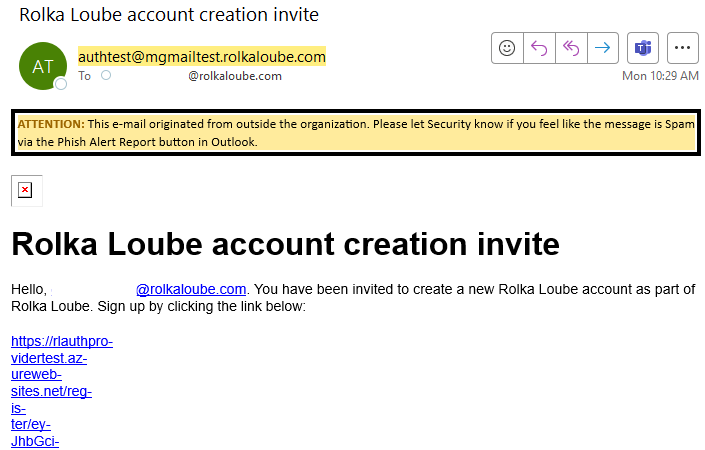
Open the email from auth@auth.rolkaloube.com with the subject, Rolka Loube account creation invite.
-
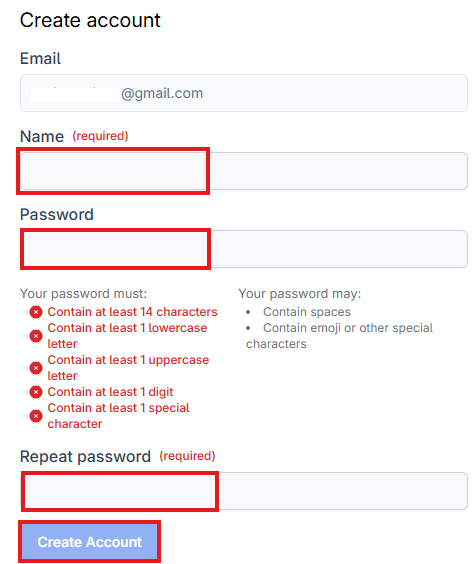
Select the link in the email. The Create Account page opens in your browser.
-
Enter your name in the Name field.
-
Enter a new password that meets the password requirements in the Password field.
-
The password must meet the following requirements.
-
Be at least 14 characters
-
Contain at least 1 lowercase letter
-
Contain at least 1 uppercase letter
-
Contain at least 1 digit
-
Contain at least 1 special character
Note: Your password may contain spaces, emoji, or other special characters.
-
-
-
Re-enter your password in the Repeat password field exactly as it was entered above. The password must match that in the Password field.
-
Select Create account.
-
Get your tenant’s account manager to assign you any roles you may need.
Accept or Decline an Invite (Existing Account)
-
Sign in to the Rolka Loube Authenticator.
-
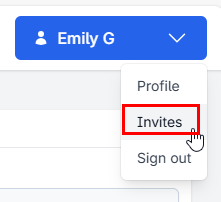
Select the blue button with your name in the upper right corner of the screen.
-
Select Invites from the drop-down menu. The My Invites page appears.

-
Select one of the following:
-
Accept to join the tenant.
-
Decline if you do not want to join the tenant.
-